Short answer: To avoid Binance P2P scams, release USDT only after you see the full payment in your own bank or wallet app. Never trust a screenshot, an SMS or a message in chat. When you buy, pay only from an account in your own name, to the account shown in the order, and tap Transferred, Notify Seller after the money has left your account. If anything does not match, do not release and do not cancel: open Appeal.
Checked: October 2026
This guide covers the scams. For the trading steps, read the Binance P2P guide first. New to the coin itself? Start with What Is USDT?.
Binance locks the seller’s crypto when an order is placed. That protects the buyer from a seller who disappears. It does not check your bank payment for you, and that gap is where most scams happen.
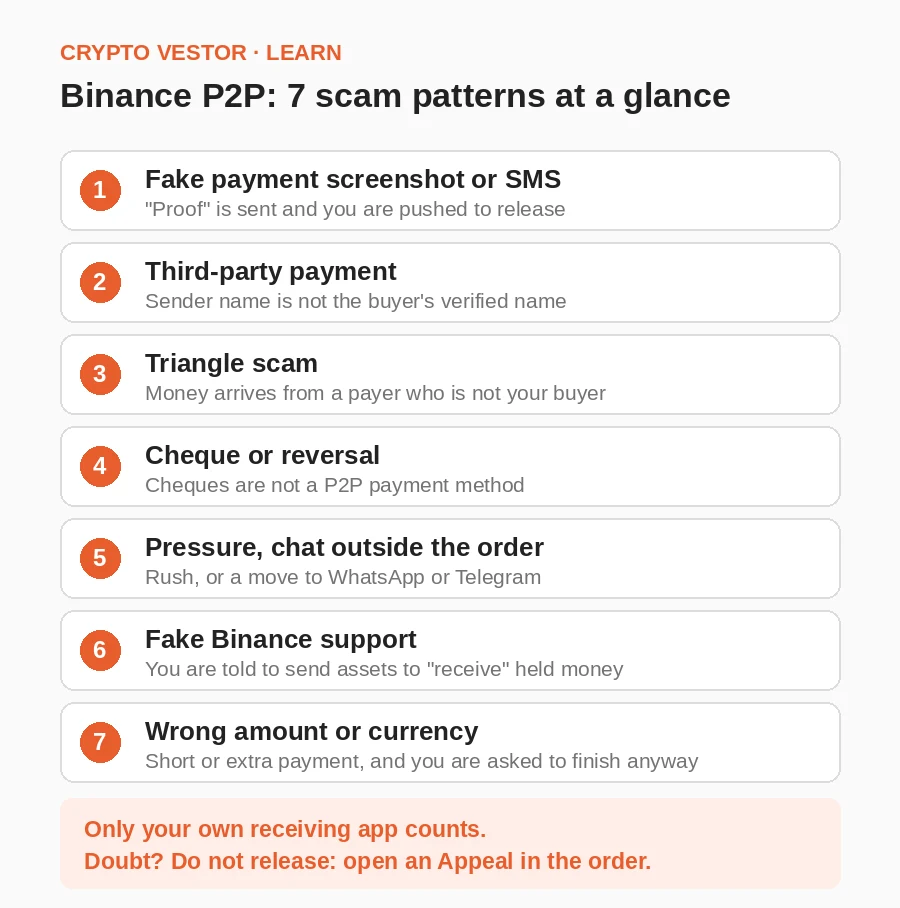
Seven scam patterns and what to do
1. Fake payment screenshots and SMS
How it works: The buyer sends a “proof of payment” and presses you to release. Binance says fraudsters send SMS messages that look identical to bank notifications, and that a fake record can have spelling mistakes, misaligned text or different fonts.
Spot it: You may not. A good fake looks like a normal receipt, so do not rely on spotting flaws.
Do this: Log in to your own bank or wallet app and find the incoming transfer. Compare the amount and the sender’s name with the order. If you cannot open your account, do not release, whoever is pushing you. Report the buyer to Binance support.
2. Third-party payments
How it works: The money comes from someone else’s account. Often that account holder can later dispute the transfer, and the money is taken back after you have released.
Spot it: The sender’s name is not the buyer’s verified name on the order.
Do this: Do not release. Open Appeal and say the name does not match. Under Binance’s appeal rules, the crypto is then not released, the seller is asked to refund the buyer in full, and the buyer’s P2P function can be suspended. Refund the money only through the dispute, not to new account details from chat.
3. Triangle scams
How it works: Binance describes it like this: two scammers place separate orders with the same seller. Scammer A orders 5,000 USDT worth, scammer B orders 6,000. Scammer B pays 5,000 to the seller, and scammer A marks their order as paid. The seller releases to A. Then B pays another 1,000 and shows the same 5,000 proof to get the second order released. The seller has released twice and received half or less.
Spot it: A receipt that covers more than one order, or a buyer who points to a payment you cannot match to this order.
Do this: Check your balance for the full and exact amount of this one order. Check every pending transfer, not just the last one. Treat proof shown by the counterparty with caution, because it can be reused.
4. Cheques and payment reversals
How it works: Binance P2P does not offer cheques as a payment method. Binance says a scammer can issue a cheque and cancel it right away, or pay with one that bounces, and that asking for a chargeback on a cheque is very easy. Some other payment methods can also be reversed after the fact.
Spot it: A buyer who insists on a cheque, or says “it will show up soon”.
Do this: Say no to a cheque at once. Check your available balance, not only the current one, because they are different. If a completed payment is reversed after release, open an appeal for that order, add your records and document everything. Keep the order record and the bank reference for every trade.
5. Pressure and chats outside the order
How it works: The other side creates a rush (“release fast, I am late”) or asks you to talk on WhatsApp or Telegram. Binance’s guidance says never to talk to your trading partner on third-party apps, and its transaction policy says trades arranged through outside channels are not covered if you lose money.
Spot it: Any demand to hurry before you check the payment, or new payment details that appear outside the order.
Do this: Keep everything in the Binance order chat. Check the payment first and release later. Binance’s advice: never be pressured to release, whoever asks. If you are the buyer and the seller says to cancel after you paid, do not cancel. Wait for the release, and use Appeal if it does not come.
6. Fake Binance support and the “held payment” trick
How it works: Scammers pose as Binance support in the P2P order chat. Binance describes one version: they say the buyer has paid and the money is held in Binance’s account. To “receive” it, you are told to send assets to an unknown account. Then comes a convincing fake email about a “Binance P2P Escrow service” that tells you to release crypto before you get paid. Phishing pages may also try to collect your password, 2FA codes or seed phrase.
Spot it: A support agent who asks for your password, authentication code or seed phrase. Anyone who says money is held somewhere and you must send or release first. Binance says it never sends emails asking you to complete a P2P transaction.
Do this: Release only after the money arrives in your own account. Never send assets to an unknown account to “unlock” a payment. Open Binance yourself, not a link from a message, and contact support there. If you shared a code or password, contact official support at once and secure the account.
If a payment is genuinely delayed, for example a bank has frozen it, Binance’s appeal rules say the seller should contact Binance customer service. If the seller does not, Binance assumes the payment was received. So tell support clearly that you have not been paid.
7. Wrong amount, wrong currency
How it works: The amount that arrives is not the order amount, and you are asked to complete the trade anyway. Binance’s appeal rules cover both cases. Underpayment: the buyer is asked to pay the rest within a given time. Overpayment: Binance customer service contacts the seller about a refund, and if the seller refuses, the buyer is responsible for the loss.
Kenya example: Binance warns about buy ads that list M-Pesa with US dollars as the currency. M-Pesa works in Kenyan shillings, so such an ad is a red flag. In Binance’s example, a 50 USD trade is “paid” with KES 50, about 0.35 USD. For the steps in Kenya, read Binance to M-Pesa.
Do this: Compare the amount and the currency with the order. Do not release against a short payment. If you overpaid by mistake, appeal and let support handle the refund, and do not send money back by yourself on a chat request.
Seller checklist before release
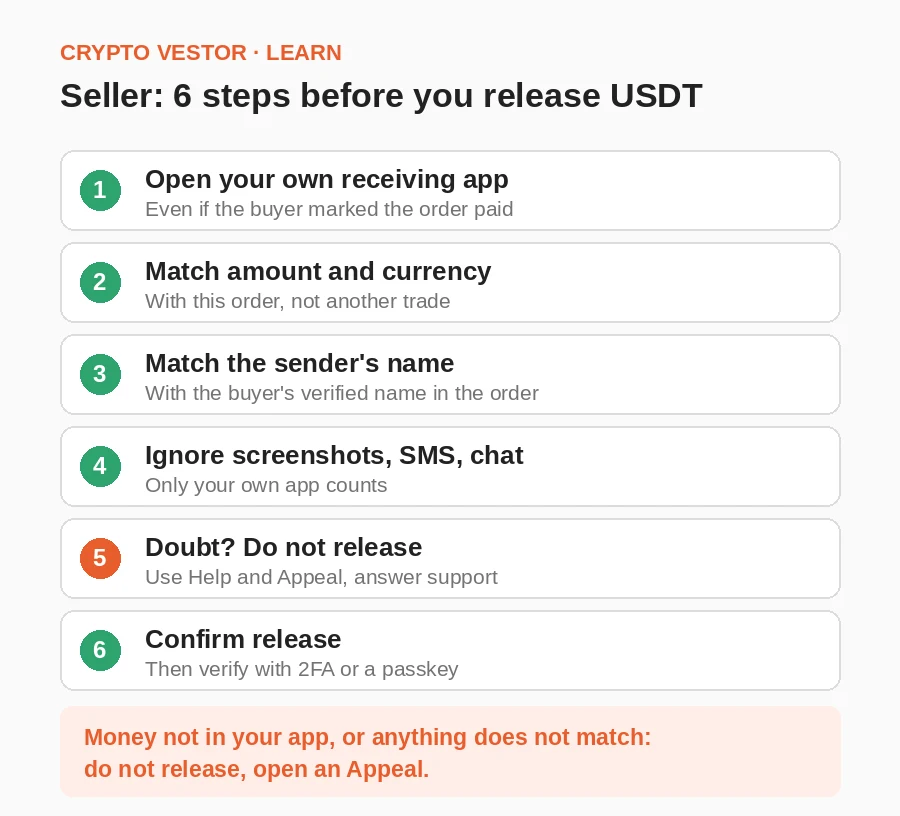
- Open your own receiving app. Check the history even if the buyer marked the order paid.
- Match the amount and the currency with this order, not a receipt from another trade.
- Match the sender’s name with the buyer’s verified name in the order. Any mismatch: stop and appeal.
- Do not trust a screenshot, SMS or chat message. Only your own app counts.
- Doubt? Do not release. Use Help and Appeal, and answer support while it reviews.
- Release only then. Tap Confirm release and verify with 2FA or a passkey. Binance’s rules say that after you confirm the full payment, you must release the crypto within 15 minutes.
Buyer checklist before paying
- Pay from your own account. Use a bank or wallet account in your verified Binance name. Never pay a third party or use a friend’s account.
- Open View Payment Details and pay only the account shown in the order. Ignore “new” details from chat.
- Check the amount and the currency.
- Keep the payment note clean. Binance’s appeal rules say sensitive words such as “Binance”, “P2P”, “BTC”, “C2C” or “digital currency” in the note can cause problems, and if a refund is needed, the buyer covers the refund fees. Do not write them, even if the seller asks.
- Tap Transferred, Notify Seller only after the money has left your account. Tapping early breaks Binance’s rules. Save the receipt and the transaction reference.
- Never cancel a paid order. If the seller does not release, write in the order chat, then tap Appeal. A reminder: cancelling three orders in one day also blocks you from taking P2P orders for the rest of that day.
What to do if you were scammed
If the order is still open: tap Help, then Appeal, choose Customer Service, select the issue, describe what happened in detail and add screenshots. Check progress under Progress. Binance says the other side has 10 minutes to reply to an appeal, and if they do not, the status changes to a review by customer service.
If the order is already completed or cancelled: go to Orders, filter by Fulfilled, then Canceled or Completed, open the order and tap Need Help. Binance lists these reasons: the order was cancelled after the buyer paid, the seller never received payment, the buyer filed a chargeback after release, less money arrived than expected, and the buyer paid extra. Add more evidence later under Appeal History.
Save the order details, the whole chat, receipts and bank records. If support asks for a video, Binance says the seller should show the bank history proving the money did not arrive, with the account number, date, time and names visible, record it with a second device without editing, and hide the password. A wrong video can delay the case.
Also report fraud to your bank. In Nigeria, the CBN says you must first complain to the bank where the issue started, give it about two weeks, and only then escalate to the CBN Consumer Protection Department. For theft, Binance advises contacting the police and says recovery is not guaranteed.
Avoid anyone who offers to recover your money for an upfront fee. Binance calls such recovery services second-order scams.
Risks: P2P trading carries counterparty and payment risks, and crypto prices can fall. Binance says recovering your money is not guaranteed. Check your local rules before you trade. Readers in Nigeria should see Is Binance Legal in Nigeria?. This article is for information only, not financial or legal advice. Read our Disclaimer.
Frequently asked questions
Is Binance P2P safe?
Escrow protects the USDT during an order, but scams are still possible. The safety comes from your own checks: names, amounts, your own app and the order chat only.
Can a seller be scammed with a fake screenshot?
Yes. A seller who releases USDT against a forged receipt can end up with no money. Binance’s rule is simple: release only after you confirm the funds in your own account.
What if the buyer says they paid but I see nothing?
Do not release. Open Appeal, add your transaction history and say clearly that the payment has not arrived. If support asks, record the bank history as proof.
Can I be scammed as a buyer?
Yes. Paying an account that is not in the order, or cancelling after you paid, puts your money at risk. Binance says it is not liable for a payment sent to an account outside the order and a refund is not guaranteed. Pay only the account shown, and appeal if the seller does not release.
Does Binance refund P2P scams?
Do not count on it. The outcome depends on the dispute. Binance’s rules say a seller who releases without confirming payment carries the loss and Binance cannot guarantee recovery.